Players join a campaign through a single invite link. There is no email invite step, and nobody needs an account beforehand.
Send the invite
- Open your campaign.
- Click Copy Invite Link, then paste it into your group chat or Discord.
The same link works for everyone, as many times as needed.
The arrow beside that button opens a menu that writes the message for you, so there is nothing left to type:
- Invite by email, Invite by text message and Invite on WhatsApp open your own app with the message and the link already filled in.
- Share opens your device's usual share sheet, which is the way to reach Discord and anything else installed. It shows up wherever your browser offers one, which covers phones as well as Safari and Chrome on a computer.
- Copy invite message copies the link with a sentence around it, rather than a bare address, ready to paste into a party channel.
Every one of them sends the same link, so it does not matter which you use.
If your campaign is linked to a Discord channel, running /rollcall nudge there can post the invite for your party to see.
Approve requests
Clicking the link does not add someone to the party. They sign in, and their request appears on your campaign page as pending. You approve or deny each one.
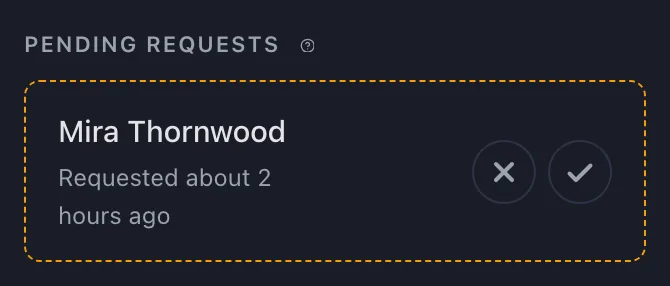
Roll Call emails and Discord-DMs you as soon as someone asks to join, then reminds you again if a request is still waiting a day later, as long as you can approve another player. Pending players do not count toward your player limit and are not included in scheduling.
Once at least two players have joined, you can click Begin scheduling on the campaign page. Roll Call collects availability and proposes times only after you click it. See starting scheduling.
What players do next
An approved player sets their availability and can connect a calendar. Until the session poll has their answers, they do not count toward quorum.
Replace the link
- Open the menu next to Copy Invite Link.
- Choose Regenerate link.
- Confirm.
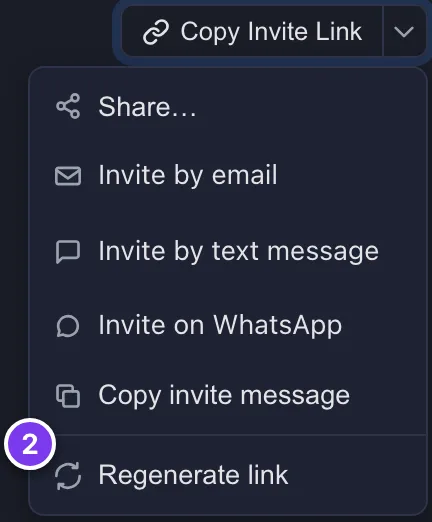
The old link stops working immediately. Current party members are unaffected.
Removing players
You can remove a player from the member list at any time. A removed player cannot rejoin using the invite link. To reverse this, re-add them from the same list.
Player limits
Each plan caps how many approved players a campaign can hold. When a party is full, approving another player is blocked. See plans and the free trial.