
Session schedule windows set which days a campaign can play and the hours each session must fit inside.
The three day modes
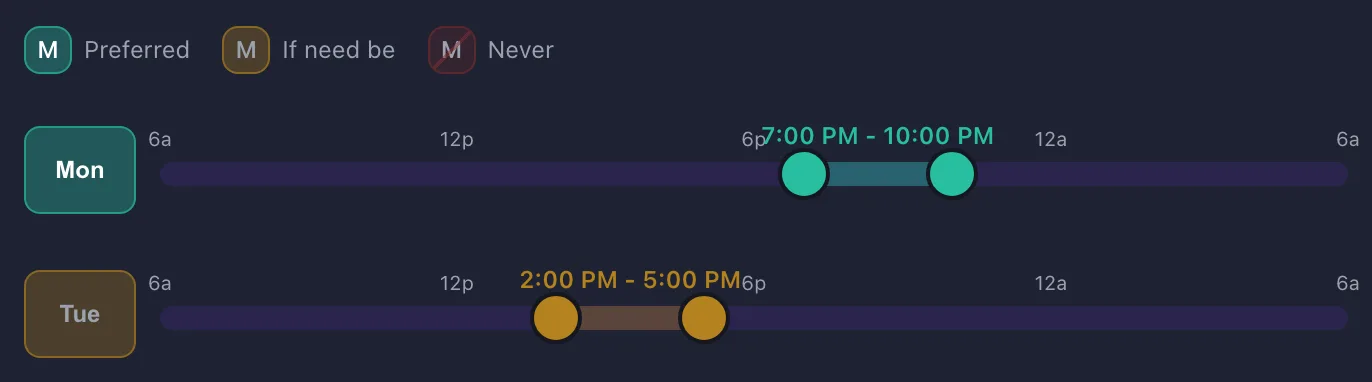
Click a day to cycle through the modes:
- Preferred. A day the group wants to play.
- If need be. Workable, but not ideal.
- Never. Nothing is proposed on this day.
Windows and session length
The handles on each day set the earliest a session can start and the latest it can end. Session length is a separate setting.
With 3-hour sessions, a window of 5 PM to 10 PM allows a start from 5 PM to 7 PM. Roll Call proposes a session in the middle of the window, 6 PM to 9 PM. It moves a session only when a player who answered if need be is busy during the window, with a calendar event or a day off, or when that start falls outside the times a player narrowed the window to. A moved session starts inside those times and clear of the busy time when it can; when no start does both, it stays where it was. The one exception to the end of the window is a flexible session duration: a moved session may run past the end by up to that much, the extra time the session poll already offers players.
Window width
A window only as long as a session allows a single start time.
Marking a few days if need be beats marking them never.
Widening one end of a window can move the proposed session.
Windows vs player availability
Windows are the campaign's rules and only the GM sets them. Each player then has their own availability inside those rules, and it pre-fills their answers for the times the poll asks about.
One-off gaps
For a single week away, block the dates rather than switching a day to never. Roll Call also skips major holidays when that option is on. See Blocking dates for your campaign.